The Fundamentals of Computer Science

Introduction
The year was 1998. Google had just been founded, offering a significantly better search experience. Microsoft had become the biggest company in the world, and the web was rapidly becoming a part of everyday life. It was also my first year at the University of Canterbury in Christchurch, New Zealand. I had planned to study Electronics Engineering, but according to the student enrolment officer (to whom I somehow entrusted the future of my career) my high school exam results weren’t good enough. He recommended a Bachelor of Science instead.
I’d been interested in computers and programming since I typed in my first BASIC program on a Commodore 64 at age nine. In my teen years I discovered HTML and began building personal web sites. During my first year at university, it dawned on me: I could actually make a living doing what I loved - building websites. So I left university and enrolled in the National College of Design and Technology (Natcoll) which was offering a Diploma of Internet Technology, the first ever web development qualification in New Zealand. The nine-month course covered the basics of web design, programming and server management. I loved every moment, met life-long friends and quickly landed a job as a web developer at a small local consultancy. That experience kickstarted a 20+ year career in software development, where I learned mostly on the job.
Like many self-taught programmers, I often felt I was missing out on some fundamental knowledge that co-workers with a computer science degree had. I felt like an imposter. So I was excited to discover a book called The Imposters Handbook, written by Rob Connery, who is also a self-taught software developer and had similar feelings of missing out on some foundational knowledge. In this article, I’m going to touch on a few topics from the book I found particularly interesting. We’ll start with a refresher on the binary number system, boolean algebra, then see how these two ideas are combined to create logical circuits that allow computers to perform arithmetic operations.
Why learn about computer science?
As software developers, we’re often abstracted away from the inner workings of computers and the underlying principles of computation. But those abstractions can leak, so understanding what’s happening under the hood can be incredibly helpful. It can deepen your understand of the tools and abstractions you use, like choosing a sorting algorithm or understanding how cryptography works. It’s also super interesting to learn about the history and foundations of what we do every day.
Binary and Number Systems

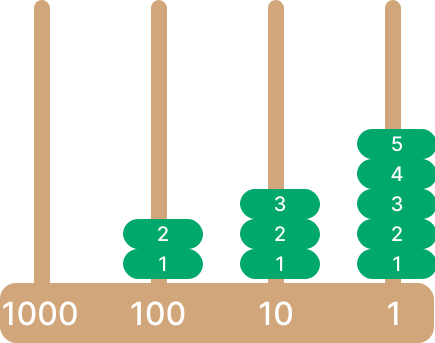
Binary is a base-2 number system, in contrast to the decimal (base-10) system we use in everyday life. I find it helpful to think about number systems in terms of a simple abacus.
In an abacus, each column holds a number of beads representing digits. Each column represents the base raised to a power, increasing from right to left. In order to represent a number, you fill columns from left to right to add up to the result.
Decimal (base 10)
In decimal, each column can contain up to 10 beads (representing digits 0 through 9).
To represent 235 in decimal, we have no beads in the thousands column (because 235 is smaller than 1000), 2 beads in the hundreds column, 3 beads in the tens column and 5 beads in the ones column (0 × 1000 + 2 × 100 + 3 × 10 + 5 × 1 = 235).
Binary (base 2)
In binary, each column can hold a single bead (1) or no bead (0).
In order to represent 235 in binary, we have a bead in the 128, 64, 32, 8, 2 and 1 columns to make up the number (128 + 64 + 32 + 8 + 2 + 1 = 235).

So, 235 in binary is 11101011.
Hexadecimal (base 16)
The Hexadecimal system allows up to 16 beads to fill each column. Our standard numerical system only has 10 digits (0-9), so we use letters A-F to present the remaining 6 digits: 0123456789ABCDEF.
In order to represent 235 in hexadecimal, we need 14 beads in the sixteens column and 11 beads in the ones column to make up the number (14 × 16 + 11 × 1 = 235).
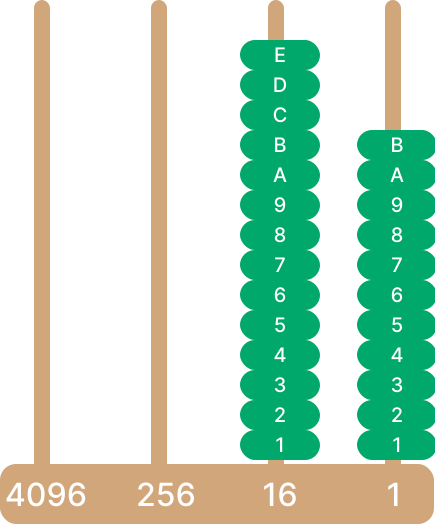
14 in hexadecimal is E and 11 is B, so 235 in hex is EB.
For centuries, the binary number system was mostly a mathematical curiosity without much practical use. Then in the 1930’s American mathematician and electrical engineer Claude Shannon discovered that by combining Boolean algebra with the binary system, he could control digital circuits.
We’ll come to Claud Shannon and digital circuits soon, but first let’s talk about Boolean algebra.
Boolean Algebra
Boolean algebra is a branch of mathematics that deals with two values - true and false, and the logical operations used to manipulate them: AND, OR, and NOT. It is a fundamental concept in computer science and is used by computers to perform operations.
As developers, we use Boolean logic daily, whether it’s writing an if statement, checking a condition, or evaluating a combination of boolean values.
The idea of reasoning with true and false statements dates back to ancient Greece. The philosopher Aristotle created a system of logic using propositions (statements that are either true or false) and rules of inference. His work laid the philosophical groundwork for binary logic, even though it wasn’t yet expressed in mathematical form.

In 1854, British mathematician George Boole published “An Investigation of the Laws of Thought”, where he introduced a symbolic system of logic that could express these binary values algebraically. This new form of algebra allowed logical reasoning to be expressed through equations and operators, just like numerical arithmetic.
Boolean operations
While elementary algebra deals with numerical operations, Boolean algebra deals with logical operations. These operations form the backbone of programming logic and the design of digital circuits.
Primary operations
A & B represents an AND operation.
A || B represents an OR operation.
A ! B is a NOT, or inversion operation.
Secondary operations
Each of these operations can be represented by grouping the primary operations together:
Exclusive OR (XOR):
(A || B) && !(A & B)Implication (if A then B):
!A || BEquivalence (equality):
(A & B) || (!A & !B)
There are no numbers in Boolean algebra, only symbols for true and false values.
Truth tables
To visualise and understand the outcome of boolean operations, we can use Truth tables. These tables enumerate all possible combinations of input truth values and their corresponding output.
We will use 1 to represent true and 0 to represent false.
AND truth table
If A is true AND B is true, then the output is true.
| A | B | OUT |
| 0 | 0 | 0 |
| 0 | 1 | 0 |
| 1 | 0 | 0 |
| 1 | 1 | 1 |
OR truth table
If A is true OR B is true, then the output is true.
| A | B | OUT |
| 0 | 0 | 0 |
| 0 | 1 | 1 |
| 1 | 0 | 1 |
| 1 | 1 | 1 |
XOR truth table (Exclusive OR)
This is similar to OR, except both values for A and B must be different for the output to be true.
| A | B | OUT |
| 0 | 0 | 0 |
| 0 | 1 | 1 |
| 1 | 0 | 1 |
| 1 | 1 | 0 |
Implication truth table
Implication can be used as a conditional statement. B will only be evaluated if A is true. If A is false, then the outcome is always true (1)
| A | B | OUT |
| 0 | 0 | 1 |
| 0 | 1 | 1 |
| 1 | 0 | 0 |
| 1 | 1 | 1 |
Equivalence truth table
Equivalence is similar to equality. If A or B are the same, then the output is true (1).
| A | B | OUT |
| 0 | 0 | 1 |
| 0 | 1 | 0 |
| 1 | 0 | 0 |
| 1 | 1 | 1 |
Boolean arithmetic
Boolean operations from our truth tables above can be used to perform arithmetic. Let’s see how:
An OR operation represents addition:
1 + 1 = 1
1 + 0 = 1
0 + 0 = 0
0 + 1 = 1
In Boolean arithmetic, results are always either true (1) or false (0). So 1 + 1 can only equal 1 (not 2).
An AND operation represents multiplication:
1 x 1 = 1
1 x 0 = 0
0 x 0 = 0
0 x 1 = 0
Note that subtraction and division do not exist in boolean algebra. Subtraction is often implemented using two's complement, which converts subtraction into addition. Division is typically achieved through repeated subtraction.
Boolean operations serve as the building blocks for logical circuits that process and compute information in digital computers.
Logical Circuits
Claude Shannon

Often regarded as one of the most influential yet overlooked figures in computer science, Claude Shannon laid the foundation for the Information Age with his groundbreaking work in Information Theory. Here is an except from the the book A Mind at Play: How Claude Shannon Invented the Information Age:
Every single concept from Boole’s algebra had its physical counterpart in an electric circuit. An on switch could stand for "true" and an off switch for "false," and the whole thing could be represented in 1’s and 0’s. More important, as Shannon pointed out, the logical operators of Boole’s system—AND, OR, NOT—could be replicated exactly as circuits.
By merging principles of Boolean algebra and binary representation with electronic circuits, Shannon forged a path that revolutionised computing.
Computing Machines

Early mechanical devices used proportional differences between gears to perform calculations. They were limited to specific tasks and lacked the versatility of general-purpose computations.
Digital computers perform calculations using electronic switches to implement logical circuits. The types of switches that were used changed as technology developed:
Relays: Early digital computers implemented logical circuits using mechanical electronic switches called relays. These systems were cumbersome, slow, and noisy.
Vacuum Tubes: Represented a step up but demanded extensive maintenance and still occupied significant space.
Transistors: A game-changing innovation, transistors offered a compact, solid-state solution that allowed computers to become smaller and more dependable.
Integrated circuits: The integrated circuit emerged in the 1960s, miniaturising computers further by hosting thousands of transistors on a tiny silicon chip. Today billions of transistors are housed in a single CPU.
Transistors
A transistor typically consists of 3 leads:
The base: responsible for activating the transistor
The collector: positive lead
The emitter: negative lead

When a small voltage is applied to the base, it allows a larger voltage to flow from the collector to the emitter. This behaviour allows the transistor to function as a binary switch, flipping between 'ON' (1) and 'OFF' (0) states.
Logic Gates
Transistors can be combined in certain ways to create 'logic gates'. These gates execute basic logical functions that are crucial in performing complex computational tasks. The most common logic gates include:
AND Gate: Outputs 1 only when both inputs are 1.
OR Gate: Outputs 1 if any input is 1.
NOT Gate: Flips the input (1 becomes 0 and vice versa).
XOR Gate: Outputs 1 if only one input is 1.
These logic gates can be demonstrated using a simple circuit consisting of a power source, switches, and a lamp. The positions of the switches are the inputs (closed = 1, open = 0), and the state of the lamp is the output (on = 1, off = 0).

Performing arithmetic using logic
We've seen how you can add Boolean quantities using an OR statement, now let's perform ordinary arithmetic using Boolean representations:
0 + 0 = 00
0 + 1 =  01
1 + 0 =  01
1 + 1 =  10
In binary, 2 bits are required to represent the number 2. The extra bit is "carried" to the left. The rightmost bit is reset to 0 because of the carry.
| A | B | A+B |
| 0 | 0 | 00 |
| 0 | 1 | 01 |
| 1 | 0 | 01 |
| 1 | 1 | 10 |
Notice the leftmost bit of the sum represents the result of an AND operation. The rightmost bit is the result of an XOR operation:
| A | B | AND | XOR |
| 0 | 0 | 0 | 0 |
| 0 | 1 | 0 | 1 |
| 1 | 0 | 0 | 1 |
| 1 | 1 | 1 | 0 |
We can use this idea to create circuits that perform calculations.
Logic Circuits
By chaining together different logic gates, we can create logic circuits. These circuits can perform more complex operations and calculations.
The Half Adder
A binary half adder is a logic circuit that adds two single-bit binary numbers, producing a sum and a carry bit. The circuit consists of one XOR gate and one AND gate.

The Full Adder
A full adder is a combination of two half adders with an additional OR gate to manage the carry bit. A full adder can add three binary digits, two operands and a carry bit.

By chaining multiple full adders together, we can create circuits capable of adding much larger binary numbers. This is a cornerstone for many computational operations in our electronic devices.
For example, let’s see how we can add two numbers (27 and 15) together using a chain of full adders.
Row A is the binary representation of the first number, 27. Row B is the binary representation of the second number, 15.
Move from right to left to sum each column (A + B + Carry). Carry a 1 to the next column if the result is greater than 1. The final result is 42.

Bitwise Operations
Bitwise operations manipulate individual bits within a binary number. They are fundamental for low-level programming, optimisation, and working with hardware.
Bitwise operators apply an operation to a set of digits from right to left. In Ruby, bitwise operations are represented as:
AND:
&OR :
|XOR:
^NOT:
~Left shift:
<<Right shift:
>>
For example, the AND operation 13 & 11 = 9 can be visualised as:
   1 1 0 1 (13)
&  1 0 1 1 (11)
   ———————
   1 0 0 1 (9)
Bit Shifting
Bit shifting is a binary operation that involves moving the bits of a binary number to the left or right. Shifting bits to the left multiplies the number by a power of two, while shifting to the right divides it by a power of two. This operation is commonly used to perform efficient multiplication and division, as well as for manipulating data at a low level.
Bitwise left shift:
7 << 2 = 28
000111 << 2 = 011100
Bitwise right shift:
40 >> 2 = 10
0101000 >> 2 = 0001010
Conclusion
Learning about computer science helps us to better understand the abstractions we use every day, nail technical interviews, and learn about the history of our craft.
Pioneers like George Boole and Claude Shannon created ideas and concepts that forged the path for modern computing.
If you’re interested in learning more about fundamental ideas in computer science, I highly recommend reading The Imposter’s Handbook and A Mind at Play.